

FraudLabs Pro lets you configure multiple fraud validation rules, each with its own action, namely Approve, Manual Review, or Reject. When several rules are active, understanding the order in which they’re evaluated is key to predicting how a transaction will be flagged.
Execution Logic #
FraudLabs Pro uses a simple sequential checking model:
- Rules are evaluated in order, starting from Rule #1 through to the last rule.
- As soon as a rule matches, the checking process stops immediately, and the transaction is flagged with that rule’s defined action (Approve, Manual Review, or Reject).
- If none of the rules match after the full sequence is checked, the transaction is automatically flagged as Approve.
In short: first match wins. The subsequent rules are never evaluated once a match is found.
Example Walkthrough #
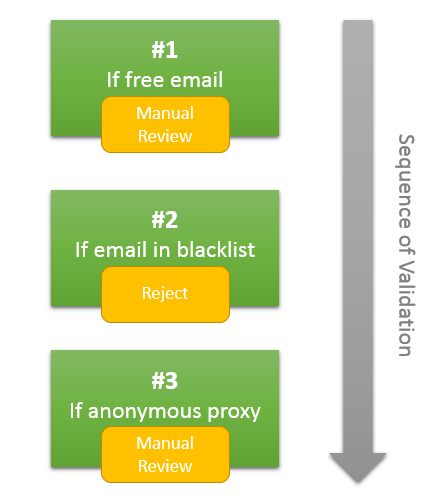
Assuming you created 3 validation rules for Free Email, Email in Blacklist and Anonymous Proxy as above. (Note: to ease the explanation, this tutorial will not display the exact rule name but a short representation)
Scenario 1: Free email address (e.g., a Yahoo account) #
Rule #1 matches immediately. Checking stops here, and the transaction is flagged as Manual Review. Rules #2 and #3 are never evaluated.
Scenario 2: Company email, but previously blacklisted #
Rule #1 doesn’t match (it’s not a free email), so checking proceeds. Rule #2 matches, checking stops, and the transaction is flagged as Reject. Rule #3 is never evaluated.
Scenario 3: Clean company email, no proxy detected #
None of the three rules match. The sequence completes with no match found, so the transaction is automatically flagged as Approve.
Key Takeaway #
Because the first matching rule determines the outcome, rule order matters. Placing stricter rules (e.g., Reject conditions) earlier in the sequence ensures they’re checked before more lenient rules that might otherwise catch the same transaction first.
Earn 1 extra validation rule + 100 bonus queries through our limited-time campaign.
Ready to start with FraudLabs Pro? #
Get Micro plan for free, you can quickly explore and integrate with our fraud prevention solution in minutes.