


In online fraud detection, understanding customer purchasing behavior extends beyond analyzing what items are bought or where an order originates—when a transaction occurs is equally critical. Legitimate customers naturally establish predictable shopping habits tied to their daily routines, active hours, and local time zones. When an order deviates sharply from these established temporal patterns, it frequently serves as an early indicator of malicious activity, such as Account Takeover (ATO) attacks, automated credential stuffing, or unauthorized card testing.
Transaction Hour Validation addresses this vulnerability by evaluating the timestamp of an incoming order against historical baseline behavior. By identifying temporal anomalies such as an unexpected late-night transaction from an account that historically purchases during regular business hours—merchants can automatically flag suspicious transactions, prevent chargebacks, and protect authentic user accounts before order fulfillment occurs.
FraudLabs Pro recently introduced a new validation rule to validate transaction hours based on predefined schedules. Merchants can control what happens when a transaction occurs at unintended hours—choosing to review it manually, or approve or reject it automatically.
This rule is accessible on the Rules Management page and is available exclusively to merchants subscribed to the Medium plan or higher.
Why Is Transaction Hour Validation Important? #
Transaction Hour Validation is crucial because fraudsters often strike outside regular operational hours, leveraging off-peak times when manual oversight is low. By identifying unexpected temporal anomalies—such as unusual late-night purchases—this rule helps merchants prevent Account Takeover (ATO) attacks, automated card testing, and chargebacks before order fulfillment.
When Is Transaction Hour Validation Most Useful? #
Transaction Hour Validation is most useful when merchants know the peak operating hours of their business. For example, a merchant may want to flag orders placed outside normal business hours for additional screening.
This rule can also help businesses that want to apply different handling procedures to transactions received at specific times. By automating these decisions, merchants can improve fraud screening efficiency while allowing legitimate orders to proceed according to their configured rules.
How to Set Up Transaction Hour Validation #
Follow these steps to configure the Transaction Hour Validation rule in FraudLabs Pro:
- Log in to the FraudLabs Pro merchant portal.
- Click on the Rules menu to expand the submenu, then select Order Transactions.
- On the Rules page, click the Add Rule button.
- In the search bar, type Transaction Hour and select it from the list.
- In the Value section, click the input box and choose the desired hours from the dropdown menu.
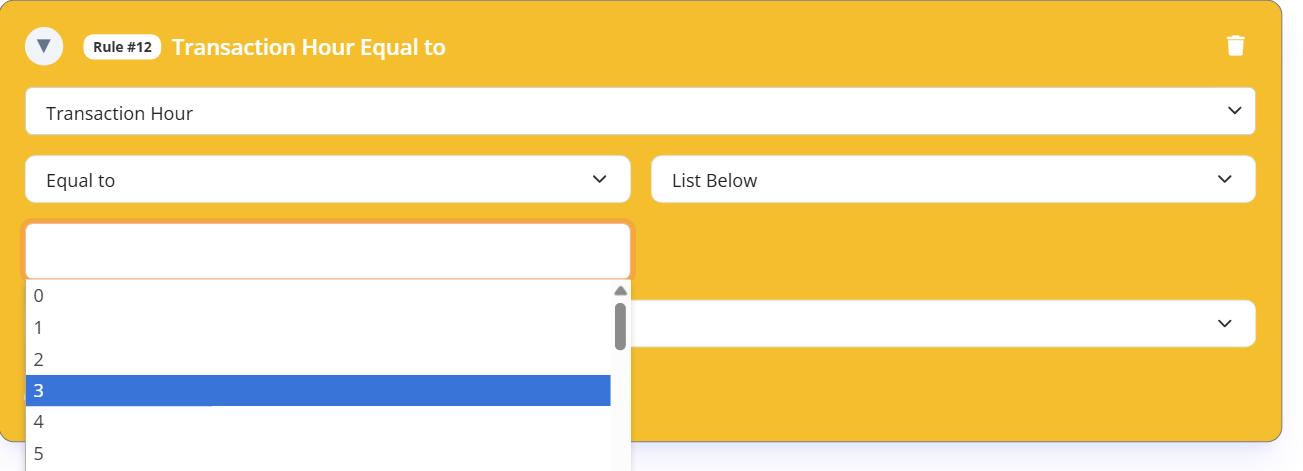
- Select an Action and click Save.
- Done.
Conclusion #
Transaction Hour Validation provides an essential layer of security by flagging orders placed outside normal business hours. By customizing rules to automatically review, approve, or reject off-hour purchases, merchants can stay one step ahead of automated fraud while maintaining a frictionless experience for legitimate customers.
Secure Transactions, Seamless Business #
Say goodbye to fraud worries! Secure your online store with FraudLabs Pro now.