

Real-time notifications are vital for proactive fraud prevention, allowing merchants to stop suspicious behavior instantly via alerts on channels like email or Slack. This rapid response protects revenue by reducing chargebacks and secures customer trust by blocking unauthorized account access. Ultimately, automated alerts empower businesses to maintain a safe environment and lower operational costs through faster detection. FraudLabs Pro introduces Pipedream notifications to enhance order validation. By updating its Pipedream component, FraudLabs Pro now allows merchants to configure instant alerts whenever an order is validated. This enhancement empowers merchants to respond immediately to potential fraud and maintain direct, real-time communication with their customers.
What is Pipedream #
Pipedream is an event-driven, low-code platform designed to build and run workflows that automate tasks across thousands of different applications and APIs. The platform handles server infrastructure and allows users to quickly connect services using webhooks and custom triggers to process incoming data, referred to as a “signal”. In the context of fraud monitoring, Pipedream captures signals from the Fraudlabs Pro API, and routes that data to the next step in a defined workflow. This architecture is what enables merchants to create real-time, automated responses, like instant notifications or triggering specific actions.
In this tutorial, we will demonstrate how to configure the integration between Pipedream and FraudLabs Pro. It is important to note that while this tutorial utilizes the Gmail application as the primary Action App within the workflow, the platform offers the flexibility to select any alternative Pipedream-integrated application to serve as the designated Action App for your specific workflow.
Create a workflow in Pipedream #
- Log in to your Pipedream account. Click on Projects in the sidebar menu.
- Click on the “+ New Workflow” button on the top right. You can use any existing project or create a new project.

- Click the Add Trigger button and type “FraudLabs Pro” in the search bar to look for the FraudLabs Pro. Click on “FraudLabs Pro” in the search result, then click on “Status Changed (Instant)” from the sources list.
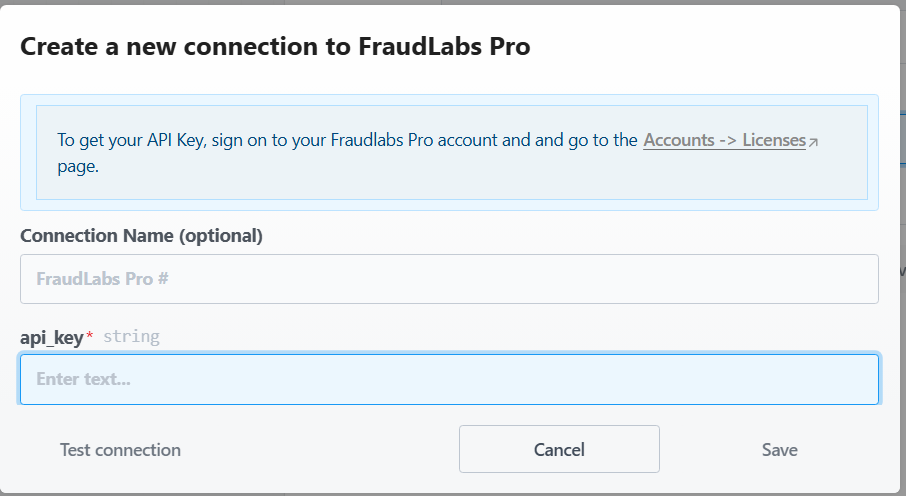
- Click on the “Connect a FraudLabs Pro account” button and enter your FraudLabs Pro API Key. Click Save to save the configuration.
- Click on the + button on the left side under the trigger, and search for Gmail. Click on Gmail from the search result.
- From the actions list, select the Send Email action.
- In the action configuration, click on the “Select a Gmail account…” and choose either a pre-existing connected account or connect to a new Gmail account.
- Customize the email template.
- Click deploy to deploy the workflow to live.
Enable Pipedream notification in FraudLabs Pro #
- Login to FraudLabs Pro Merchant Area.
- Click on the Settings in the left menu bar.
- Under the Pipedream Notification section, select the status to enable the notification.
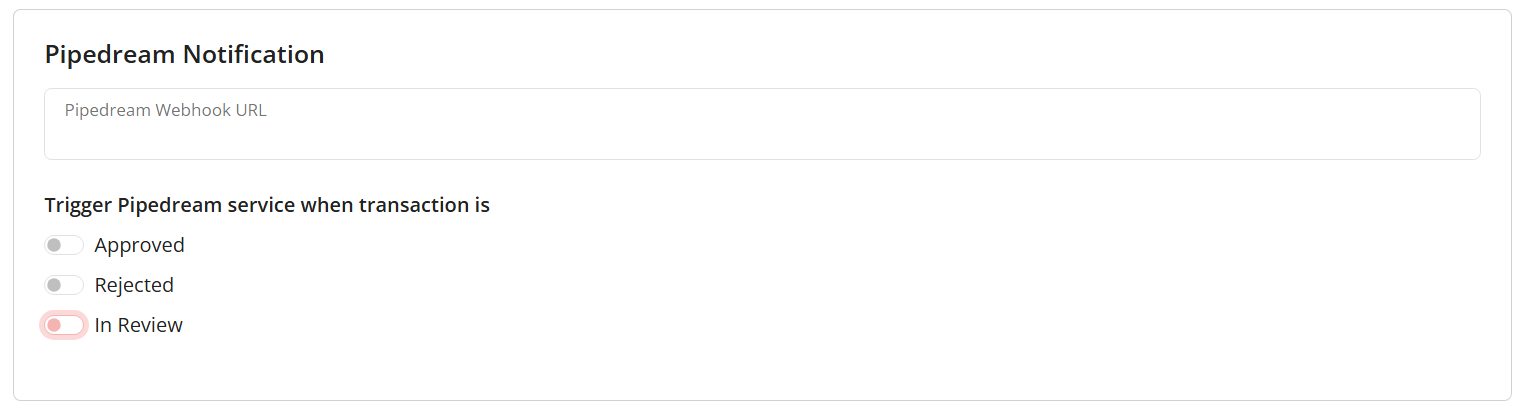
- Click on Save Changes.
- Done.
Benefits of Using Pipedream Notifications with FraudLabs Pro #
Integrating Pipedream notifications into FraudLabs Pro offers several advantages:
- Real-Time Alerting: Automated triggers ensure that merchants receive instant updates on transaction statuses, allowing for immediate intervention against suspicious activity.
- Extensive App Integration: The flexibility of Pipedream allows users to route fraud signals to thousands of third-party applications, including Slack, Discord, or custom webhooks.
- Operational Efficiency: By automating the notification process, businesses can significantly reduce the manual effort required to monitor and report fraudulent orders.
- Customizable Workflows: Merchants can design complex logic within Pipedream to filter or format fraud data specifically for their internal reporting and audit requirements.
Conclusion #
In conclusion, the successful integration of Pipedream notification with FraudLabs Pro establishes a robust mechanism for proactive fraud management. By leveraging Pipedream’s event-driven architecture, merchants can transform validated order signals into instant, automated responses across diverse third-party applications. This capability ensures real-time intervention against suspicious transactions, minimizing financial exposure and enhancing operational efficiency through highly customizable workflow logic.