


Introduction #
Sylius is an open-source e-commerce platform and framework built on the Symfony PHP framework, designed to offer a flexible and scalable foundation for custom solutions. It empowers developers with extensive documentation for deep customization, including the ability to define specific validation rules and form constraints. This architecture enables businesses to build bespoke digital storefronts tailored to unique requirements without the constraints of monolithic systems. Its API-first approach ensures seamless integration with various third-party services and front-end technologies for a modern, decoupled user experience.
Implementing fraud prevention in a Sylius e-commerce store is essential for safeguarding your business against financial loss and protecting customer data. By automatically screening transactions for potential threats, you can significantly reduce the risk of chargebacks, which can be both costly and damaging to your merchant reputation. Furthermore, maintaining a secure checkout environment builds trust with your shoppers, ensuring that legitimate customers feel confident completing their purchases without fear of compromise.
The FraudLabs Pro Sylius Plugin is a fraud prevention extension designed to assist merchants in protecting their Sylius e-commerce stores from fraud. It integrates seamlessly into the Sylius checkout process and automatically screens orders for fraud risk using the FraudLabs Pro API. In this tutorial, we will show you how to download and install the FraudLabs Pro Sylius plugin. By following this tutorial, you will be able to add fraud protection to your online store.
Prerequisites #
This tutorial assumes that you have a working Sylius online store. If you do not have one, follow the guides in the documentation.
The extension will require a FraudLabs Pro API key to work. You can get a free API key via sign-up now.
Installation #
1. Install the FraudLabs Pro Sylius Plugin via Composer:
composer require fraudlabspro/sylius-fraudlabspro-plugin2. Manually register the plugin by adding the bundle to your config/bundles.php file if Symfony Flex didn’t do it automatically:
return [
    // ...
    FraudLabsPro\SyliusFraudLabsProPlugin\FraudLabsProSyliusFraudLabsProPlugin::class => ['all' => true],
];3. Because this plugin adds a ChannelConfiguration entity to securely store your API keys per channel, you must run database migrations to update your database:
bin/console doctrine:migrations:diff
bin/console doctrine:migrations:migrate4. Clear the application cache:
bin/console cache:clear5. Log into your Sylius Admin dashboard, and navigate to Configuration -> Channels in the left sidebar.
6. Select and edit the channel you want to protect.
7. Scroll to the FraudLabs Pro section at the bottom of the page.
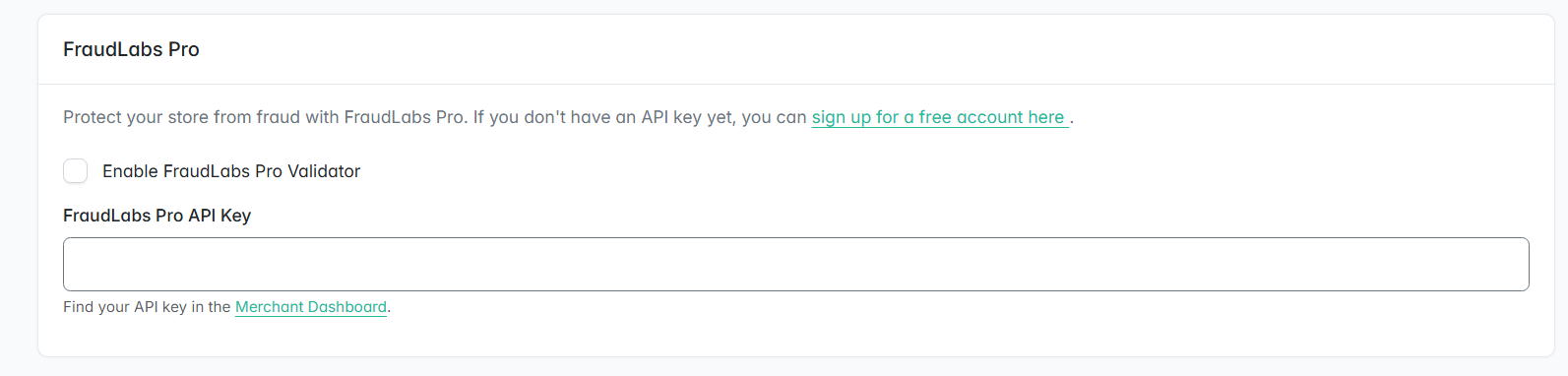
8. Check the Enable FraudLabs Pro Validator box to enable the plugin.
9. Enter your FraudLabs Pro API Key. You can find it in your Merchant Dashboard after signing up.
10. Click the Update button to save the changes. Now your store shall be protected by the plugin.
Conclusion #
By following these steps, you have successfully integrated the FraudLabs Pro plugin into your Sylius store. Your checkout process is now enhanced with automated fraud screening. Remember to regularly monitor your Merchant Dashboard and order status to ensure your store remains fully protected and to adjust your validation rules as your business grows.
Free Fraud Protection Today! #
Start safeguarding your business with FraudLabs Pro Fraud Prevention at Zero Cost!