


Introduction #
We are pleased to introduce the updated custom webhook notification payload for FraudLabs Pro, designed to streamline real-time transaction tracking and offer seamless integration for your fraud detection workflows. Transitioning to a structured JSON format, the new payload delivers key transaction data—including order id, customer name and email, and order amount—directly to your custom endpoint. This modernization improves data readability, simplifies server-side parsing, and ensures your system receives reliable, instant updates whenever order statuses or manual review decisions are triggered in the FraudLabs Pro merchant portal.
What’s New in the Custom Webhook #
Compared to the V1 payload, which used the id and action fields, the V2 payload uses more descriptive field names and includes additional transaction and customer information. The table below highlights the changes between the two payload versions.
| V1 Field | V2 Field | Description |
id | fraudlabspro_id | The unique identifier for the transaction. |
action | fraudlabspro_status | The final action based on the rules analysis. |
| – | user_order_id | The merchant identifier used to uniquely identify a transaction. |
| – | full_name | The user’s first and last name. |
| – | email | The user’s email address. |
| – | currency | The currency used in the transaction in ISO-4217 (3 characters) format. |
| – | amount | The total amount of the transaction. |
This is a sample response in JSON:
{
"fraudlabspro_id": "20260820-DEFF8Z",
"user_order_id": "1001",
"fraudlabspro_status": "APPROVE",
"full_name": "John Doe",
"email": "johndoe@gmail.com",
"currency": "USD",
"amount": 199.00
}For more information about custom webhooks, see the Developer Guide.
How to Switch Your Custom Webhook to V2 #
This update will work seamlessly for new users, who will receive the v2 format by default. However, existing users who have previously set up a custom webhook may need to follow the steps below to transition to the v2 format:
- Update the existing configuration in their custom webhook endpoint.
- Log in to their FraudLabs Pro account dashboard.
- Go to the Settings > General.
- Navigate to Custom Notification Settings under the Notification Settings section.
- Locate the button under the Custom Webhook URL setting and click on it.
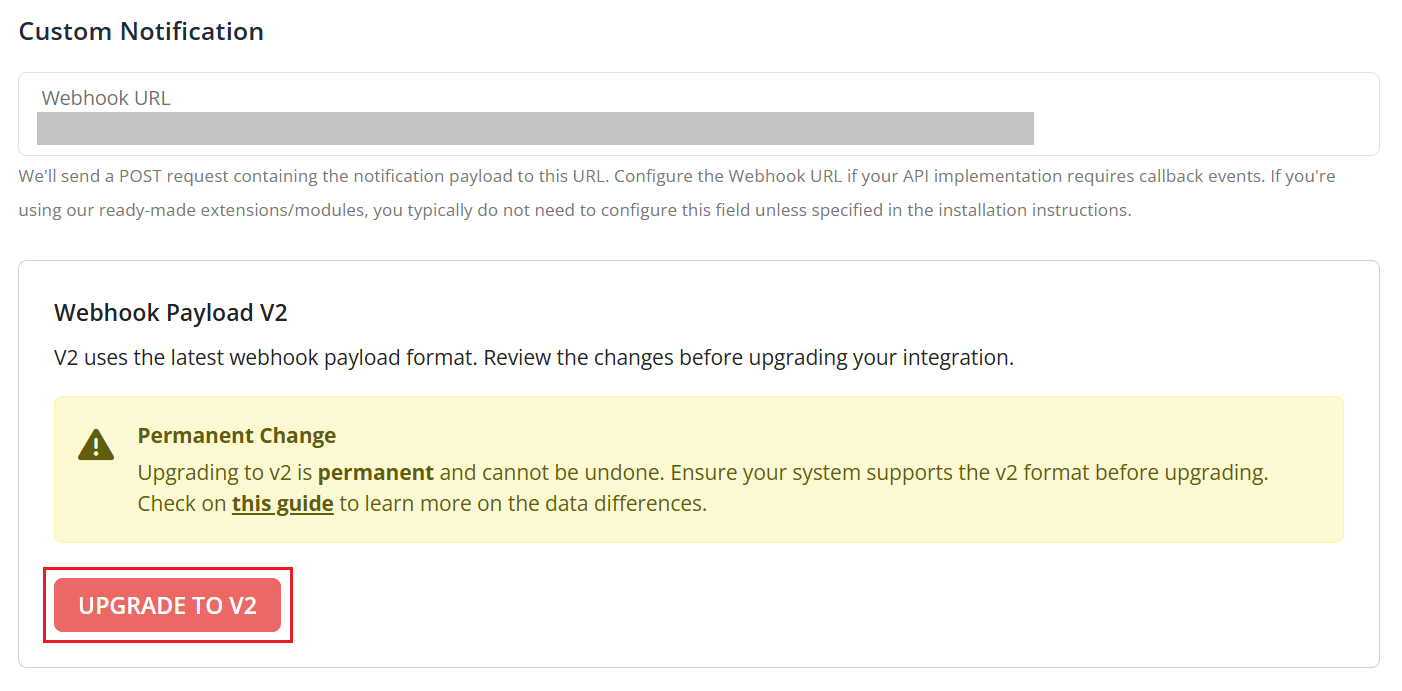
- You will receive data in v2 format from now on.
Conclusion #
The V2 custom webhook payload provides more complete transaction information in a structured JSON format, making it easier to integrate FraudLabs Pro notifications with your existing workflows. New users will receive V2 by default, while existing users can switch their custom webhook configuration to V2 from the FraudLabs Pro merchant portal.
Ready to Streamline Your Fraud Detection?
Integrate real-time transaction updates into your workflow & simplify fraud monitoring with webhook flexible notifications.