

Introduction #
Online fraud remains one of the biggest challenges for e-commerce businesses. From stolen credit cards and suspicious IP addresses to mismatched billing and shipping details, merchants need fast and reliable ways to identify risky transactions before they become chargebacks or revenue losses.
FraudLabs Pro ChatGPT bot brings fraud screening into a conversational interface by integrating FraudLabs Pro with ChatGPT. Instead of manually testing APIs or switching between multiple tools, users can interact with the FraudLabs Pro ChatGPT bot directly in ChatGPT to screen orders or user transactions, retrieve fraud results, and manage fraud review workflows more efficiently.
What Is FraudLabs Pro ChatGPT Bot? #
FraudLabs Pro GPT is a ChatGPT-based bot that allows users to access FraudLabs Pro fraud detection features through natural language conversations. It is designed to help merchants, support teams, operations staff, and fraud analysts screen online orders and user details quickly inside ChatGPT.
FraudLabs Pro itself is a fraud detection solution built for e-commerce transactions. It analyzes order data such as IP address, billing and shipping information, email address, phone number, payment details, transaction amount, and other risk indicators. Based on these checks, the system can return fraud results that help merchants decide whether to approve, review, or reject an order.
With FraudLabs Pro ChatGPT, users can submit order or user transaction details in ChatGPT and receive screening results without needing to build a custom integration first. This makes it easier for teams to test fraud checks, review suspicious orders, and access fraud intelligence in a more user-friendly way.
Benefits of FraudLabs Pro ChatGPT Bot #
1. Easier Fraud Screening #
FraudLabs Pro GPT lets users screen orders or user transactions through a simple chat interface. This reduces the need for technical knowledge and makes fraud detection more accessible to non-developer teams.
2. Faster Order Review #
Instead of manually checking order or user transaction details across different systems, users can enter the relevant transaction information into the ChatGPT bot and receive fraud screening results quickly. This helps speed up the review process for suspicious or high-value orders.
3. Better Support for Risk and Operations Teams #
Support, operations, and fraud prevention teams can use FraudLabs Pro ChatGPT to check orders or user transactions without needing deep technical experience. This helps businesses involve more team members in fraud review while still relying on FraudLabs Pro’s fraud detection engine.
4. Convenient Access to Fraud Results #
The integration allows users to retrieve fraud results and submit approval or rejection feedback directly through a natural conversation. This can help streamline decision-making and improve the overall workflow for handling suspicious transactions.
How to Use FraudLabs Pro ChatGPT Bot #
You can use the FraudLabs Pro ChatGPT bot to screen orders or user transactions, retrieve fraud screening results, and decide whether to approve or reject suspicious orders.
How to Screen an Order Transaction #
1. First, sign in to your ChatGPT account. Then go to the Explore GPTs marketplace.
2. In the GPT marketplace, search for “FraudLabs Pro” and select the FraudLabs Pro GPT bot.
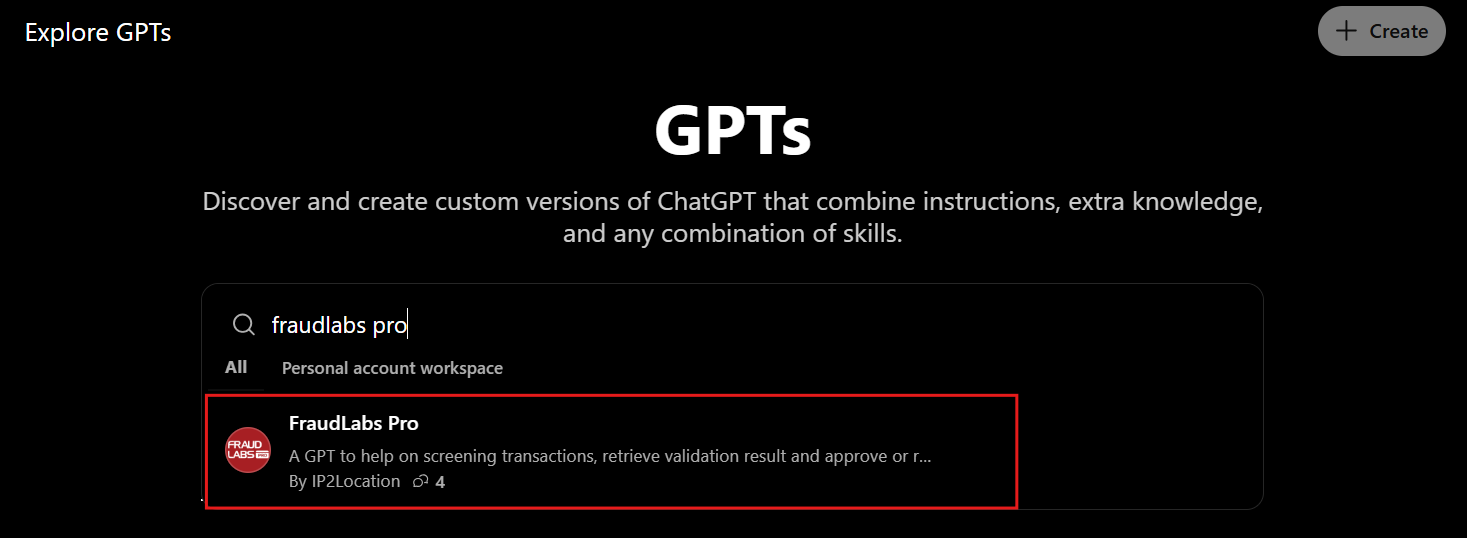
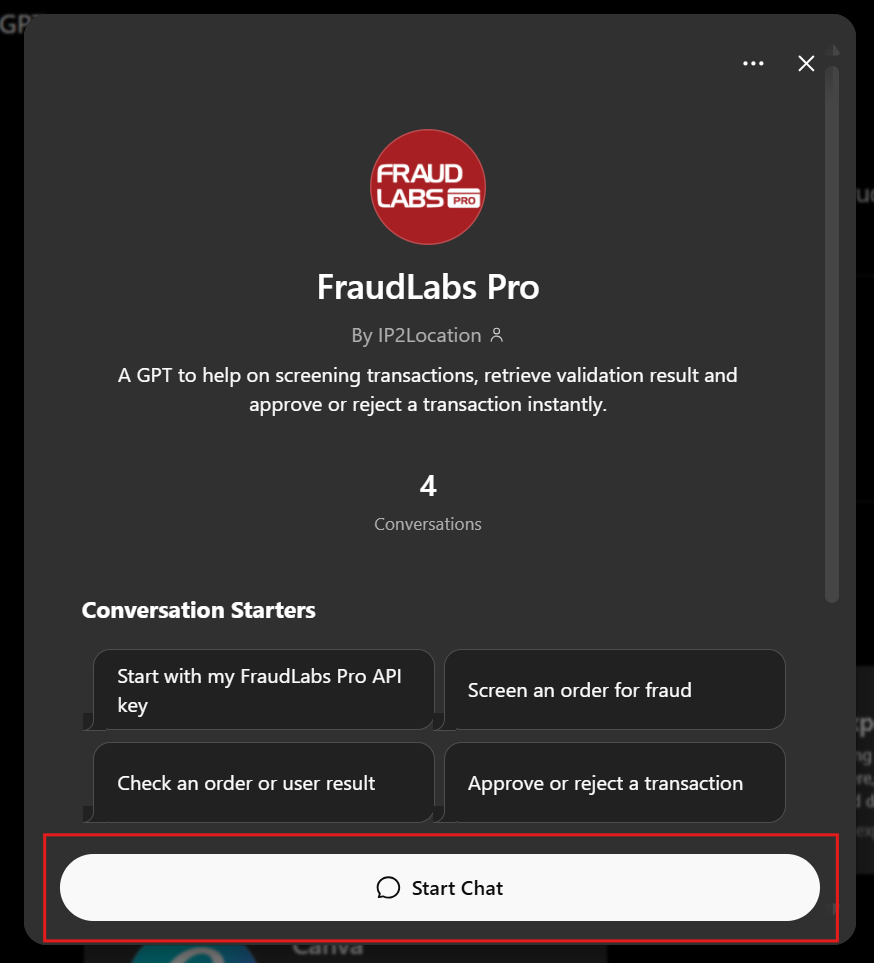
3. Click “Start Chat” to begin using the bot. For quick access, you can also visit the FraudLabs Pro ChatGPT bot as a quickstart.
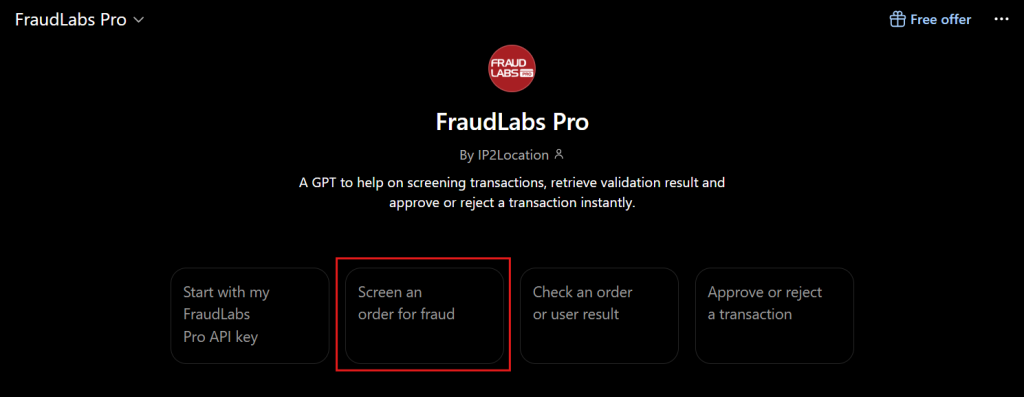
4. For a quick start, select the “Screen an order for fraud” option to start validating your order.
5. The bot will prompt you to enter your FraudLabs Pro API key. Go to the FraudLabs Pro Dashboard page to get your API key, then paste it into the chat. If you do not have an API key, you can register for a free FraudLabs Pro API key before continuing.
6. Next, provide the order information you want to screen. You may key in the order details in a JSON object. For example:
{
	"ip": "198.221.136.159",
	"last_name": "Doe",
	"first_name": "John",
	"bill_addr": "1766 PowderHouse Road",
	"bill_city": "Cleveland",
	"bill_state": "OH",
	"bill_zip_code": "44115",
	"bill_country": "US",
	"ship_last_name": "Doe",
	"ship_first_name": "John",
	"ship_addr": "4987 Bingamon Road",
	"ship_city": "Cleveland",
	"ship_state": "OH",
	"ship_zip_code": "44115",
	"ship_country": "US",
	"user_phone": "440-5551961",
	"email": "john123@gmail.com",
	"bin_no": "558265",
	"user_order_id": "1001",
	"amount": "399.00",
	"quantity": "1",
	"currency": "USD",
	"department": "Online Store",
	"payment_gateway": "stripe",
	"payment_mode": "creditcard",
}7. After submitting the order details, FraudLabs Pro ChatGPT will return the fraud screening result. You can then use the result to help decide whether the order should be approved, reviewed further, or rejected.
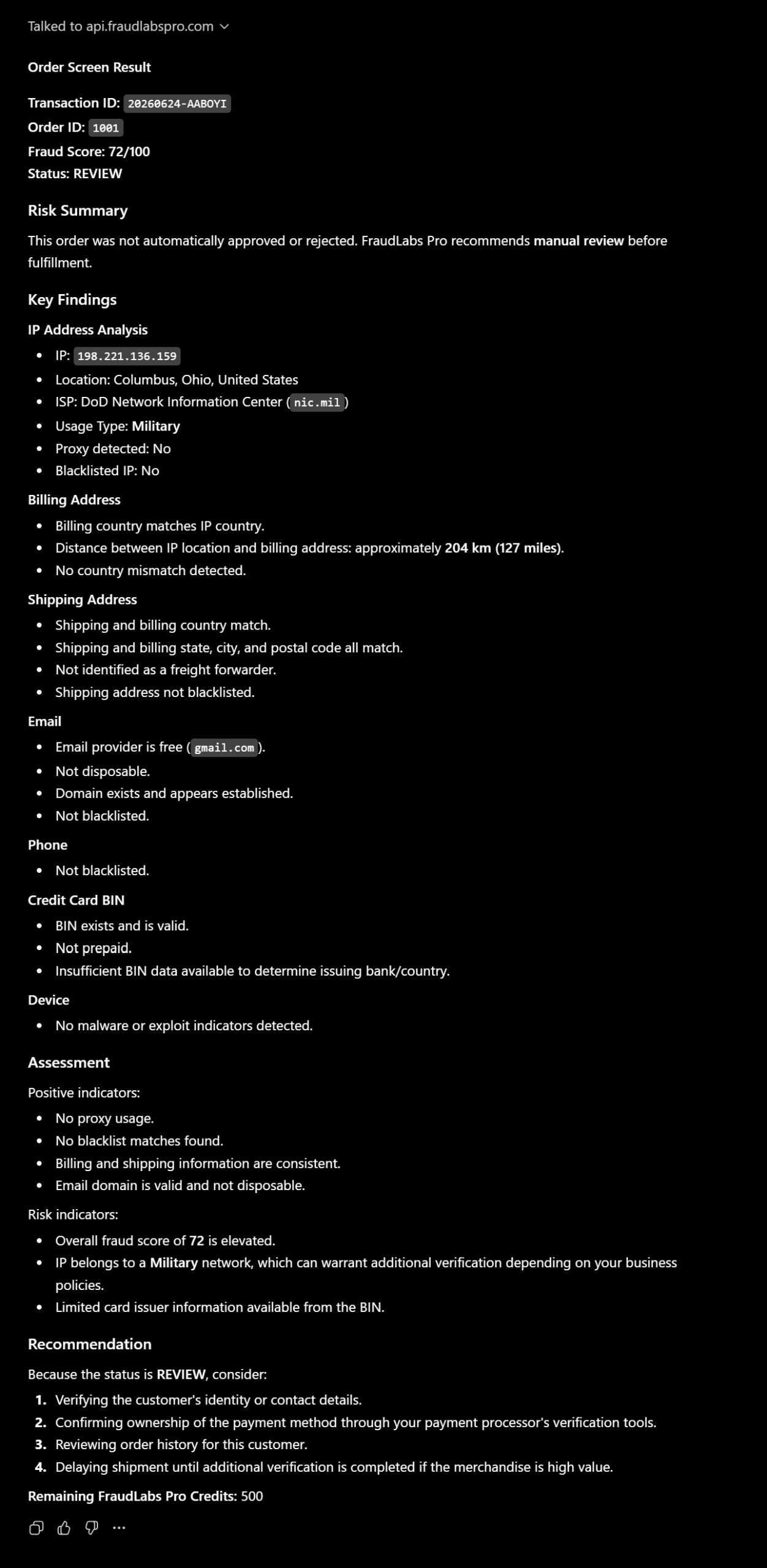
8. Tell ChatGPT if you want to reject the order, and it will mark the order as rejected.
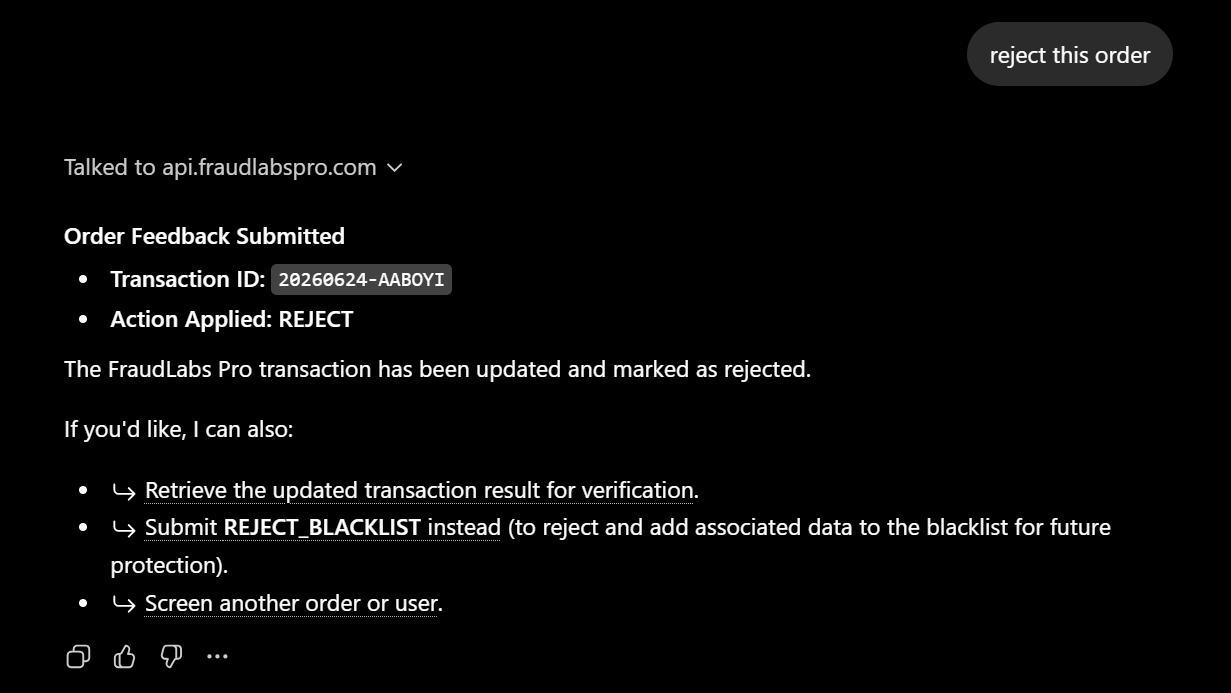
How to Screen a User Transaction #
1. First, sign in to your ChatGPT account. Then go to the Explore GPTs marketplace.
2. In the GPT marketplace, search for “FraudLabs Pro” and select the FraudLabs Pro GPT bot.
3. Click “Start Chat” to begin using the bot. For quick access, you can also visit the FraudLabs Pro ChatGPT bot as the quickstart.
4. Enter the following prompt:
Help me validate this user transaction: [user_details]
Replace [user_details] with your user transaction details. You can also try the sample user details below:
{
	"email": "hh5566@gmail.com",
	"ip": "8.8.8.8",
	"last_name": "Henderson",
	"first_name": "Hector",
	"phone": "561-628-8674"
}5. The bot will prompt you to enter your FraudLabs Pro API key. Go to the FraudLabs Pro Dashboard page to get your API key, then paste it into the chat.
If you do not have an API key, you can register for a free FraudLabs Pro API key before continuing.
Please note that this feature is available only on the Medium plan and higher. To access it, you will need to subscribe to a higher plan.
6. After submitting the user details, FraudLabs Pro ChatGPT will return the user screening result.
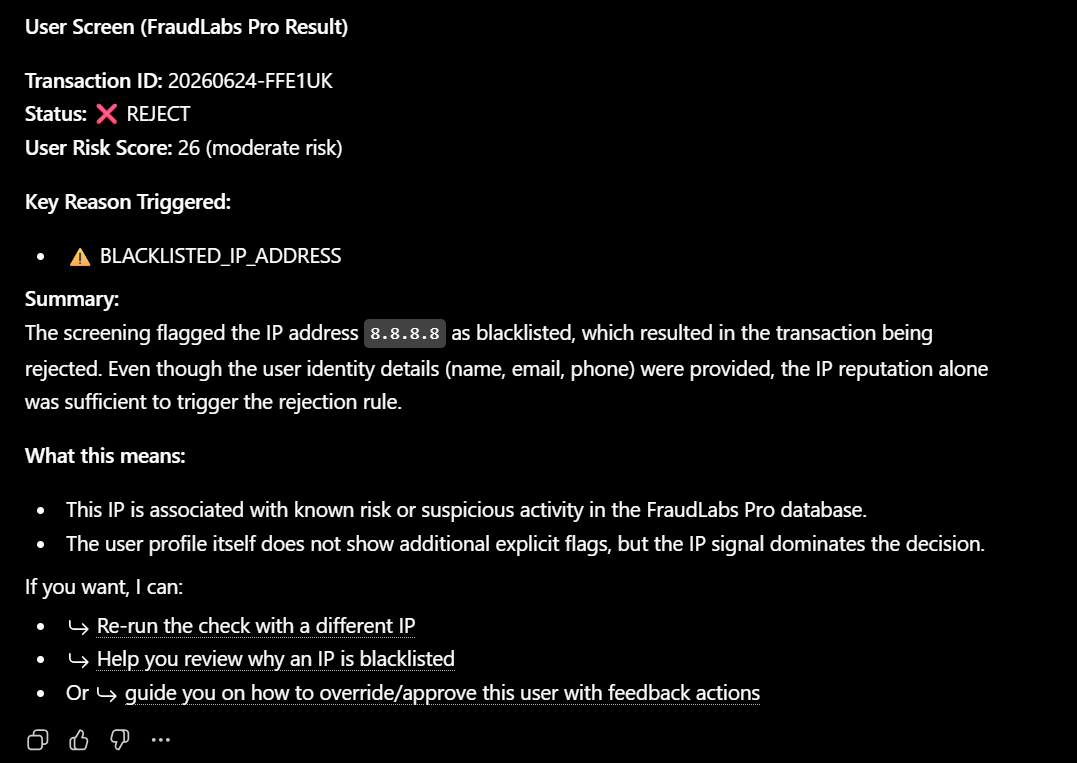
Conclusion #
FraudLabs Pro ChatGPT bot makes fraud detection easier by bringing FraudLabs Pro’s order screening capabilities into ChatGPT. It helps merchants and fraud review teams screen orders or user transactions, retrieve fraud results, and make faster decisions using a conversational interface.
For e-commerce businesses that want to reduce chargebacks, detect suspicious transactions, and simplify fraud review workflows, FraudLabs Pro ChatGPT bot offers a convenient way to access fraud detection tools without complex setup or manual API testing.
Secure Transactions, Seamless Business #
Say goodbye to fraud worries! Secure your online store with FraudLabs Pro now.