

Coupon codes are a powerful marketing tool for e-commerce businesses, but they are also frequently abused by fraudsters. To help merchants better identify and prevent coupon-related fraud, FraudLabs Pro has introduced a new Coupon Code field in the Order Screen API. This enhancement gives merchants greater visibility into how discounts are applied and enables more precise fraud validation rules based on coupon usage behavior.
This article explains what the new Coupon Code field is, how it works and how you can create a Coupon Code validation rule to strengthen your fraud detection strategy.
If you are new to running discounts, you can first learn how to create coupon codes for your online store before implementing the Coupon Code validation rule.
What Is the Coupon Code Field in the Order Screen API
The Coupon Code field in the FraudLabs Pro Order Screen API represents the coupon code(s) applied to an order transaction. This field captures the exact discount identifiers used during checkout and sends them to FraudLabs Pro as part of the order screening process.
A key feature of this field is that it supports multiple coupon codes. When more than one coupon is applied to a single order, the coupon codes are concatenated and separated using a pipe (|) symbol. For example, WELCOME10|FREESHIP|VIP2026
- WELCOME10 might be a first-time buyer discount
- FREESHIP could be a free shipping promotion
- VIP2026 may be an exclusive loyalty coupon
By capturing all applied coupon codes in a single field, FraudLabs Pro ensures that no discount data is lost during fraud analysis.
Why Coupon Codes Matter in Fraud Detection
Coupon abuse is a common fraud pattern, especially in scenarios such as:
- Repeated use of single-use or first-time coupons
- Use of employee-only or private promo codes
- Combining multiple coupons to maximize discounts
- Automated testing of coupon codes using bots
- High-risk coupon codes being used from suspicious IP addresses or devices
Without visibility into coupon usage, these fraud patterns can easily go undetected. The new Coupon Code field allows merchants to detect risky coupon behavior early, before orders are fulfilled or shipped.
Creating a Coupon Code Validation Rule in FraudLabs Pro
- Login to FraudLabs Pro Rule Management page.
- On the Rules page, click on the “Add Rule” button.
- On the Rule dropdown, select “Coupon Code Equal to List Below“.
- In the Value section, enter the coupon code.
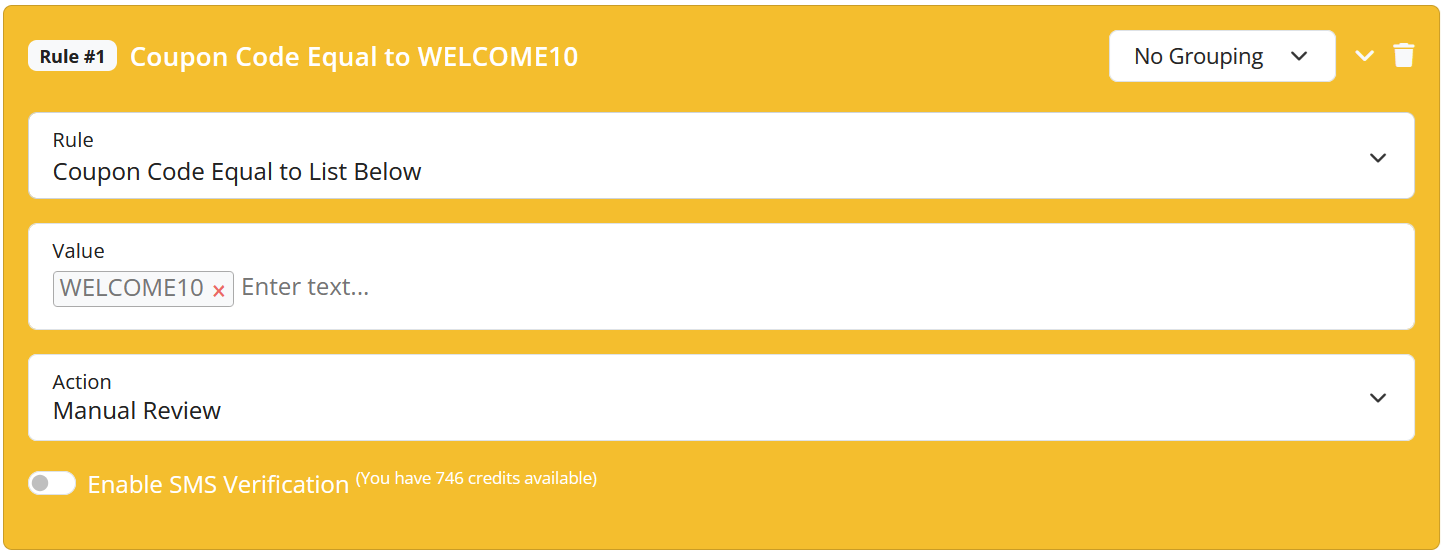
- Select the Action and then click on the “Save” button.
- Done.
The setting above shows how to flag an order for REVIEW when a specific coupon code is used. The rule checks whether the order was placed with the coupon code “WELCOME10”. If the coupon code is detected, the rule is triggered and the FraudLabs Pro status is set to the configured action (Manual Review, Approve, or Reject). If the coupon code is not present, the rule is not applied.
Please take note that this coupon code rule is for Medium plan and above only, you can subscribe or upgrade your plan to unlock it.
Conclusion
The introduction of the Coupon Code field in the FraudLabs Pro Order Screen API adds an important layer of intelligence to fraud detection. Capturing all applied coupon codes, including multiple codes separated by a pipe symbol, gives merchants complete visibility into discount usage.
When combined with a Coupon Code validation rule, this feature empowers businesses to proactively detect coupon abuse and reduce fraudulent orders without disrupting legitimate customers. As coupon-based promotions continue to grow, this enhancement ensures your fraud prevention strategy stays one step ahead.
Secure Transactions, Seamless Business
Say goodbye to fraud worries! Secure your online store with FraudLabs Pro now.